Cursor remote control is ALMOST amazing
Earlier this year I was still resisting AI-assisted development. Cursor was introduced as an option (I saw it personally and professionally) and I've never used an IDE in my entire 20+ years. I've always used Nano (or Pico!) or even Notepad on Windows. Pretty nuts, right? That's how "hands on" I really was.
I never thought of Cursor as anything other than "ugh, another IDE I should wind up using someday" - I wound up using it a little bit and it was tolerable, but it wasn't until Agent Mode was released that things really took off for me. I still don't technically use an IDE - I'm conversing with agents, organized by Workspace. All of my Workspaces (besides one local) are to my Linux box (typically) - because that's where my code is usually executing. Originally I didn't realize but every single unique conversation setup using the SSH remote option actually would keep open a shell session... until I figured out I can just set up independent agent workers and then use those as "Remote Machine" targets. This frees up the SSH key additions, one-shell-per-conversation and having to ensure direct connectivity works from desktop->target.
Now I only have a few of them running. It's easy to download the worker and configure it for your account. Then it's just sitting there waiting for work.
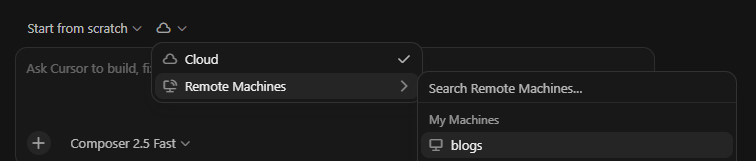
The one thing that I hope they fix soon is targeting of new conversations. It doesn't seamlessly remember "I want a fresh conversation against our Remote Machine we're already using for this Workspace" - it will try sending the work to Cursor's cloud agents, which is NOT what I want. It's a little confusing, because they're labeled the same in the UI (both show me "Remote Control") even though they've got different backends - Cloud vs. a "self-hosted" Remote Machine.
On iOS, it's even worse. All agents from the same machine get combined into one target. It's not a showstopper for me, as they are able to traverse my entire system (they're not sandboxed to each Workspace's remote "directory") - but it really throws off the human context and adds additional overhead for the agent as well ("do this work in this location" kind of thing to start) - I am sure this is just because it is a relatively new feature and they'll make it better.
When in doubt, for now, simply go to https://cursor.com/agents and you can properly target your remote machines (or the cloud) without any confusion. It seems to work logically like I would expect - "I see these workers available, where do you want to begin?" - from there, iOS and the desktop application can both pick up those conversations without a problem.
EDIT: I started a thread on the forums and already got a reply in agreement. It's always nice to get a sanity check.